Settings
This page explains what the individual settings of Rillsoft Connect do and which of them are kept when you sign out.
You open the settings in the task list with the three-dot menu → Settings.
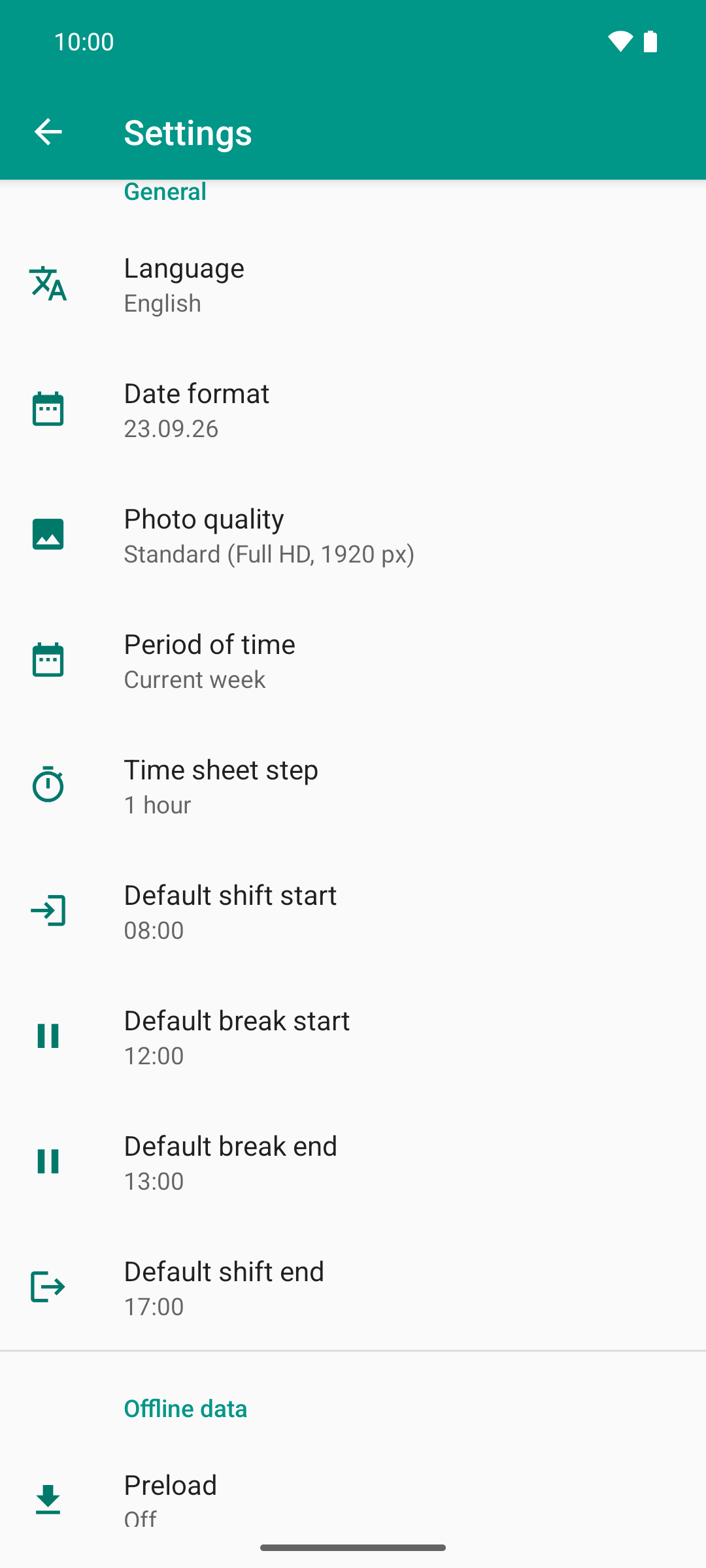
Display and time recording in one place: language, date format, photo quality, period, the time sheet step and the default times new shifts start with.
The image shows the upper part of the page. You reach the other entries by scrolling down.
Account
Entry |
Effect |
|---|---|
Signed in as |
Shows which user you are signed in as. |
Sign out |
Signs you out and deletes the data of this account from the device. Only possible with an internet connection; without network the entry is grayed out. Before that, a dialog lists what has not been transferred yet, separated into times, documents and vacation requests. See Sign out and switch accounts. |
Server
Entry |
Effect |
|---|---|
RIS server |
The address of your Rillsoft Integration Server. The default is the
Rillsoft Cloud ( |
General
Entry |
Effect |
|---|---|
Language |
Language of the app, for example English. |
Date format |
How dates appear in the app, for example 23.09.26. |
Photo quality |
The size to which the app scales down photos from the camera and the gallery. The default is “Standard (Full HD, 1920 px)”. See Photo quality and data usage. |
Period of time |
How large the period is that the task list shows, for example “Current week”. The paging buttons jump by this span; their label shows the jump, such as -1W and +1W. |
Time sheet step |
By how much the plus and minus buttons of the time recording move a clock time, for example “1 hour”. The same step applies to the remaining effort. |
Default shift start, Default shift end |
Start and end of the workday the app creates when no shift at all has been recorded on a task yet. Default 08:00 to 17:00. |
Default break start, Default break end |
The break around which the app splits this workday into two shifts. Default 12:00 to 13:00, that is two shifts 08:00 to 12:00 and 13:00 to 17:00. If the break is not completely inside the shift, the app creates one continuous shift. |
Preload |
Off, +4 weeks or +3 months; the default is Off. Loads upcoming periods and the related documents in the background so that you can open them without network. See Working offline and synchronizing. |
Wi-Fi only |
On by default. Preloading then does not use a metered mobile network. |
Clean up documents |
Off, 1 week, 1 month or 2 months; the default is Off. Deletes the files of tasks whose end lies further back than the selected span from the device, not from the server. See Photo quality and data usage. |
When the app creates a new day on a task that already has shifts, it takes over the pattern of the most recently recorded day. The default shift times only apply to the very first day.
Dark mode
The app has no switch of its own for dark mode. It follows the setting of your device: if the dark theme is switched on there, Rillsoft Connect also appears dark.
What is kept when you sign out
Is kept |
Is deleted |
|---|---|
Display settings such as language, date format and shift times |
Sign-in and saved credentials |
the server address |
all tasks, times and vacation requests on the device |
all document files on the device |
The app only saves username and password if you choose Remember me when signing in.